



































 Email
Email SMS
SMS Whatsapp
 Web Push
 App Push
 Audience Sync for Ads
 Popups
 Channel A/B Testing
  Control groups Analysis
 Frequency Capping
 Funnel Analysis
 Cohort Analysis
 RFM Analysis
 Signup Forms
 Surveys
 NPS
NPS Landing pages personalization
  Website A/B Testing
  PWA/TWA
 Heatmaps
 Session Recording
 Wix
Wix Shopify
 Magento
 Woocommerce
 eCommerce D2C
  Mutual Funds
 Insurance
 Lending
  Recipes
  Knowledgebase
 Developer Docs
 Product Updates
 App Marketplace
 Academy
 Ebooks
 Case Studies
 Blog
Blog Templates
 Afreen Sheikh
Email deliverability in 2026: the 5-point checklist
If you only have two minutes, do these five things first. Everything else in this guide builds on them.
- Authenticate every domain you send from. SPF, DKIM, and DMARC are not optional in 2026. Gmail, Yahoo, and Outlook will outright reject messages that fail authentication.
- Keep your spam complaint rate below 0.1%. Hitting 0.3% in Postmaster Tools means permanent rejections at Gmail, not a slap on the wrist.
- Add one-click unsubscribe to every marketing email. The List-Unsubscribe header is required for any sender doing 5,000+ messages per day, and opt-outs must be processed within 48 hours.
- Clean your list every 30 to 60 days. Hard bounces go immediately. Contacts who haven’t opened in 90+ days should be suppressed or sent a re-engagement series.
- Warm up new sending domains slowly. Start at 100 to 500 messages per day, increase by 15-20% per week, and watch your spam rate daily until you hit target volume.
Email marketing is still one of the most preferred communication channels for brands to connect with customers in 2026. But due to strict email providers’ guidelines, your email may not reach users’ inboxes, even after being marked as sent. When this happens, even a well-crafted email campaign fails because the customer never saw the email. It may have landed in the spam folder or a hidden tab. The very purpose of marketing gets defeated when emails do not reach the inbox.
Email deliverability is the ability of emails to land in subscribers’ inboxes rather than being blocked or filtered. Email providers like Gmail and Yahoo have strict regulations; they look at a brand’s sender reputation, email authentication (SPF, DKIM, DMARC), and how users interact with their emails before deciding on inbox placement.
To support good email deliverability, brands need to improve their inbox rate by maintaining a clean email list, sending useful content and following email best practices. Brands that make these adjustments achieve higher open rates and enhance overall outcomes.
The guide explains how to improve email deliverability and further discusses how NVECTA helps businesses maximise inbox placement and email marketing performance.
What changed in email deliverability for 2026
The fundamentals of getting into the inbox haven’t really changed. Authenticate, send wanted mail, clean your list. The big shift is how strictly inbox providers now enforce those rules.
A quick timeline of what happened and where we landed:
- February 2024: Gmail and Yahoo rolled out bulk sender rules for any domain sending 5,000+ messages per day to personal accounts. SPF, DKIM, and DMARC became mandatory. One-click unsubscribe was given a June 2024 deadline.
- May 2025: Microsoft followed with the same baseline for Outlook, Hotmail, and Live.com addresses.
- November 2025: Gmail escalated enforcement. Non-compliant traffic that used to get temporary delays now gets permanent rejections.
- 2026: Spam complaint thresholds are being enforced more tightly. The working ceiling is 0.1%, not the older 0.3% line. Domains lingering at DMARC
p=nonefor years are starting to draw scrutiny.
The takeaway: edge cases that used to cause mild dips now cause clear deliverability failures. The sections below cover both the long-standing best practices and the newer compliance rules you actually have to meet.
What is Email Deliverability?
Email deliverability means how successfully your emails appear in people’s primary inboxes, where messages are likely to be noticed and opened.
Strong deliberability means your users will receive your message in their inboxes, which further reflects trust in your domain’s reputation and sending practices. Weak deliverability means your message is likely to be filtered into spam or hidden folders.
There are multiple factors that influence a brand’s email deliverability, such as how trustworthy your sending domain appears, how recipients usually respond to your emails, whether your recipient list contains genuine addresses, and whether authentication methods like SPF, DKIM, and DMARC are correctly configured.
In simple terms, email deliverability determines whether your email campaigns reach your audience, thereby improving engagement and business outcomes.
Email delivery vs email deliverability: the difference that costs revenue
People use these two words like they mean the same thing. They don’t, and the gap between them is where most marketing email goes to die.
Email delivery is whether the receiving server accepted the message. The bounce report comes back clean. As far as your ESP is concerned, the email was sent.
Email deliverability is whether the message landed in the primary inbox or got filed into spam, Promotions, or some other tab the recipient never opens.
Quick example: you send 1,000 emails. 970 are accepted (97% delivery rate). Of those, 320 land in spam. Your real deliverability rate is 65%. The dashboard shows you a green number, but most of your audience never saw the email. This is why every section that follows focuses on inbox placement, not just whether the message went out.
What’s a good email deliverability rate in 2026?
Use this as a quick benchmark for where your program sits.
| Deliverability rate | Tier | What it means |
| 95% or higher | Excellent | Most messages reach the primary inbox. Authentication is solid, list is clean, engagement is healthy. |
| 85% to 94% | Good | Solid program with room to clean up. Some emails are still being filtered or bounced. |
| 83% to 85% | Average | Industry baseline for marketing email. Probably leaving open rates and revenue on the table. |
| Below 80% | Poor | Real problems. Look at authentication setup, sender reputation, and list hygiene before sending another campaign. |
If you’re guessing where you sit, you probably aren’t measuring properly. The testing tools section later in this guide covers how to find your real number.
How to Improve Email Deliverability in 2026: Best Practices to Reach the Inbox
To improve email deliverability in 2026, brands need to focus on their credibility, relevance, and consistency while adhering to best practices.
Email providers protect users from irrelevant messages. By implementing best practices, your messages are more likely to reach the user’s main inbox, and it will certainly improve your campaign performance.
Set Up Proper Authentication
Authentication verifies that your email is genuinely sent from your domain and not by someone impersonating your brand, possibly a scammer. Email providers consider authentication factors before deciding whether to trust your message. Make sure you-
- Configure SPF to specify authorized sending sources
- Use DKIM to attach a secure digital signature to emails
- Publish a DMARC-enforced verification
- Monitor reports and test regularly to ensure that the authentication works correctly
Thus, strong authentication builds trust with email providers and establishes a solid foundation for good email deliverability.
Maintenance Clean Email List
A high-quality email contact list ensures your emails reach subscribers who are actually interested in your content. Sending emails to invalid or unresponsive recipients will lower engagement and result in higher complaints, both of which will damage your sender reputation. You need to-
- Removing inactive or incorrect addresses is regularly
- Avoid purchasing email databases
A healthy email list increases the chances of landing in the inbox.
Adopt Double Opt-in for New Subscribers
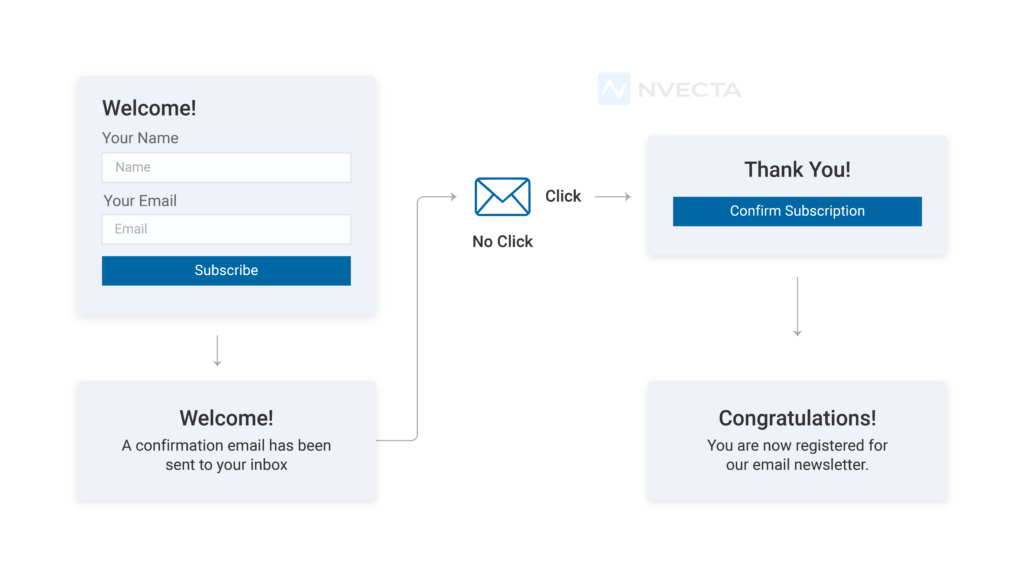
Double opt-in ensures that an individual actually wants to receive your email. This process prevents fake sign-ups and ensures the quality of your list in the long term. Follow these measures-
- Send a verification email after signing up
- Activate subscriptions only after confirmation
- Prevent bots or accidental registrations
Verified subscribers lead to stronger and long-term engagement.
Send Relevant and Personalised Content
Do not send messages that feel like generic mass emails; they are easy to ignore and will not yield any results.
Try sending tailored content that aligns with your audience’s interests; they are more likely to open it. Inbox providers interpret this interaction as a positive signal for your brand.
Just follow the measures below for relevant and personalised messaging-
- Segment audiences based on behaviour and preferences
- Personalised subject lines and body of the message
- Customise offers, updates, and discounts
Personalised communication increases engagement and the probability of inbox placement.
Manage your Sending Frequency Carefully
Sending too many emails can annoy or overwhelm your subscribers, while sending too few can make them forget your brand. It is important to strike a balance between email frequency and recipients’ frustration levels. Make sure-
- You follow a consistent sending schedule
- Offers frequency preference setting
- Monitor unsubscribe rates
This helps build a positive image of your brand in users’ minds, as you are not irritating them and are prioritising their preferences.
Monitor Complaints and Bounces
Feedback from recipients plays an important role in how email providers evaluate your email. Your sender reputation can be quickly affected by negative user feedback.
- Track bounce and complaint rates for each campaign
- Remove addresses that repeatedly failed delivery issues
- Analyse reasons behind spam reports
This continuous monitoring helps adjust targeting and improve inbox placement.
Design Emails that Look Trustworthy
Craft emails that are simple, clear, readable and professional. Such emails are less likely to be filtered or ignored by users.
- Use proper layout and easy fonts
- Maintain a balance between text and visuals
- Avoid misleading subject lines
A well-designed email supports user experience and improves engagement. Including a polished email signature also helps recipients quickly recognize the sender and adds credibility to your communication.
Comply With Evolving Providers’ Requirements
Major Email providers continuously update their policies and standards to protect recipients from unwanted messages. Comply with evolving standards and maintain good deliverability.
- Include a visible unsubscribe link
- Process opt-out requests quickly
- Stay updated with Gmail and Yahoo policies
Compliance with standards demonstrates that you respect users’ privacy, which helps maintain strong email deliverability over time.
Gmail, Yahoo, and Microsoft bulk sender requirements: the 2026 compliance checklist
If your domain sends 5,000 or more messages per day to personal accounts at any of the three big inbox providers, you’re a bulk sender. Once you cross that line at Gmail, the classification is permanent. Reducing your volume later doesn’t reverse it.
The good news: the requirements are mostly the same across providers. The bad news: failing them now means SMTP-level rejection, not a soft drop into the spam folder. Your messages bounce.
What all three providers require
- SPF, DKIM, and DMARC. All three records configured and aligned with your From header. DMARC at
p=noneis the floor; quarantine or reject is where you should be heading. - Spam complaint rate below 0.3%, ideally below 0.1%. Calculated daily. Hit 0.3% at Gmail and you lose access to deliverability mitigation until you stay clean for seven straight days.
- One-click unsubscribe (RFC 8058) on marketing email. The List-Unsubscribe and List-Unsubscribe-Post headers must be set so the inbox client can render a native “Unsubscribe” button. The link must work in one click. Opt-outs must be honoured within 48 hours.
- Valid forward and reverse DNS (PTR records). Required for any sending IP.
- TLS for transmission. Connections without encryption get rejected.
- RFC 5322 message format. Standard internet message format. Most modern ESPs handle this; legacy systems don’t always.
Transactional mail (password resets, order confirmations, shipping notifications) is exempt from the one-click unsubscribe rule. Authentication and TLS still apply.
How the three providers compare
| Requirement | Gmail | Yahoo | Microsoft (Outlook, Hotmail, Live) |
| Enforcement started | February 2024 | February 2024 | May 2025 |
| Bulk sender threshold | 5,000+ msgs/day | 5,000+ msgs/day | 5,000+ msgs/day |
| SPF + DKIM + DMARC | Required | Required | Required |
| Spam rate ceiling | 0.3% (target 0.1%) | 0.3% (target 0.1%) | 0.3% (target 0.1%) |
| One-click unsubscribe | Required since June 2024 | Required since June 2024 | Strongly recommended |
| Where to monitor | Google Postmaster Tools | Yahoo Sender Hub | Microsoft SNDS |
| Penalty for failure | Permanent rejection (since Nov 2025) | Bounced messages, spam folder | Filtering or full rejection |
If you’re under the 5,000 per day threshold today, these requirements still apply to you the moment you cross it. One growth spike, one new product launch, and the rules kick in. Most teams find it easier to comply now and never worry about it.
Hard, soft, and block bounces: what each one means and how to handle it
Bounces aren’t all the same. Treating them as one category is one of the fastest ways to wreck a sender reputation, because the wrong response to a hard bounce can keep you sending to a spam trap for months.
| Bounce type | What caused it | What to do |
| Hard bounce | Address doesn’t exist, domain is invalid, or the mailbox was permanently closed | Remove from your list immediately. Continued sending hurts your reputation and risks hitting spam traps. |
| Soft bounce | Mailbox is full, server is temporarily down, message is too large, or the recipient is on vacation responder | Retry for 3 to 5 sends. If it keeps soft-bouncing, treat it as a hard bounce and remove. |
| Block bounce | Receiving server rejected the message on reputation, content, or authentication grounds | Don’t just retry. Investigate: check your DMARC reports, spam rate, and whether your IP is on a blocklist. |
Most ESPs handle the basic retry logic for you. The piece that’s easy to miss is reviewing block bounces. They’re often the first warning sign that something bigger is breaking.
How to warm up a new sending domain or IP
A new domain has no sending history, which means inbox providers have no reason to trust it. Send 50,000 emails on day one and most of them will land in spam, even if every authentication record is configured perfectly.
Warming is how you build that history on purpose. The basic schedule:
- Days 1 to 7: Send 100 to 500 messages per day, only to your most engaged contacts. Recent openers and recent buyers, not your full list.
- Weeks 2 to 4: Increase volume by 15 to 20% per week. Keep targeting engaged segments first, then expand.
- Weeks 5 to 8: Reach target volume. Start including less-engaged contacts gradually. Watch your spam rate in Postmaster Tools daily.
- Throughout: Avoid volume spikes. A 10x send the day after a steady warmup undoes the work.
The dedicated vs shared IP question comes up here. Shared IPs are fine for most senders under 100,000 emails per month — you inherit some reputation from the pool, good and bad. Dedicated IPs make sense once you’re sending high enough volume that you want full control of your reputation, but they need warming the same way a new domain does.
How to test your email deliverability before you send
You can’t fix what you don’t measure, and most marketers never test inbox placement before hitting send. The fix is a 10-minute pre-send check.
Free tools worth knowing
- Google Postmaster Tools. The single most important dashboard if you send to Gmail. Shows your spam rate, domain reputation, IP reputation, and authentication results.
- Yahoo Sender Hub. Same idea for Yahoo, AOL, and related domains.
- Microsoft SNDS. Smart Network Data Services for Outlook, Hotmail, and Live addresses.
- Mail-Tester. Send a test email to a generated address, get a 1 to 10 spam score with specific issues called out.
- MxToolbox. Free DNS, SPF, DKIM, DMARC, and blocklist checks.
Paid testing tools worth the spend
- GlockApps. Inbox placement testing across a seed list at Gmail, Outlook, Yahoo, and others. Shows whether your message lands in Primary, Promotions, Updates, or Spam.
- Mailtrap, MailerCheck, Validity Everest. All cover similar ground with different feature mixes. Pick based on whether you also need list verification, DMARC reporting, or full reputation monitoring.
The 5-step pre-send check
- Run the email through Mail-Tester. Aim for 9/10 or higher.
- Check Postmaster Tools for spam rate over the last 7 days. Anything trending up is a warning.
- Verify SPF, DKIM, DMARC alignment with MxToolbox.
- Confirm your sending IP isn’t on a major blocklist.
- Send a seed test to your own Gmail, Outlook, and Yahoo accounts. Open it on mobile and desktop.
None of this takes long once it’s a habit. Skipping it is what causes the “why did this campaign tank” panic on Monday morning.
How NVECTA helps Improve Email Deliverability
As email provider standards become stricter every year, marketers struggle to manage email deliverability manually. Brands can use NVECTA CDP, a powerful marketing automation platform for effective email marketing.
They help brands to follow best practices and comply with evolving standards. They mitigate the risk factors and maintain a consistent inbox rate.
Advance Audience Segmentation
NVECTA improves email deliverability by sending emails to people who are actually interested. It offers advanced segmentation, allowing you to group users by behaviour, interests, and engagement.
Sending messages to smaller groups or segments boosts open and click rates, supporting emails to land in the inbox.
Behaviour-Based Personalisation
NVECTA tracks real-time user behaviour to personalise each message. When emails match users’ recent activity, such as what they searched for, viewed, or clicked on, they feel useful and improve engagement.
Messages aligned as per users’ behaviour do not annoy them and build trust.
Automated list hygiene and suppression
Email deliverability is harmed when you keep sending messages to inactive or invalid addresses. Notifyvisitors recognises those contacts who never open emails or whose addresses bounce repeatedly.
It filters your list and focuses on real users. A clean list reduces complaints and bounce rates, protecting your brand’s sender reputation and improving your chances of reaching the inbox.
Smart Sending and Frequency Control
Sending large volumes of emails can frustrate subscribers and lead to spam reports. NVECTA automates email sending and controls the frequency.
This balanced approach keeps subscribers engaged and comfortable, increasing your brand’s email deliverability.
Real-Time Analytics and Performance Tracking
NVECTA provides detailed insights into open rates, clicks, bounces, and complaints, as email deliverability largely depends on how users respond to your campaigns.
Such advanced analytics help in identifying issues at an early stage and adjust campaigns accordingly, protecting your inbox rate before deliverability is affected.
Compliance and Unsubscribe Management
NVECTA mandates that every email campaign include clear unsubscribe options and process requests quickly.
This prevents negative feedback from users. When brands respect users’ preferences, it helps in maintaining long-term deliverability.
Reliable and Secure Email Sending Environment
NVECTA has a secure, authenticated sending environment that email providers recognise as trustworthy. The risk of messages being filtered or blocked is minimal. The system supports consistent delivery and reliable email marketing.
Further NVECTA support email deliverability by intelligent AI-based targeting. It has advanced AI support at various stages of campaign creation. This boosts the effectiveness of your email marketing efforts and improves email deliverability.
Conclusion
For effective email marketing, you need to prioritise email deliverability. Just follow best practices and continuously optimise your campaigns in line with evolving standards and users’ preferences.
Use platforms like NVECTA that have built-in mechanisms for best practices and support good email deliverability. They already have the right strategy for your campaigns to consistently reach users’ inboxes and promote meaningful results.
Book your demo now with NVECTA to see how you can improve email deliverability and maximise your email marketing strategies.
Frequently asked questions
What is a good email deliverability rate?
95% or higher counts as excellent. 85 to 94% is solid with room to clean up. The industry average sits around 83 to 85%, and anything below 80% means there’s a real problem with authentication, list quality, or sender reputation.
Why are my emails going to spam?
The most common causes, in order: missing or misaligned authentication (SPF, DKIM, DMARC), high spam complaint rate, sending to inactive or purchased lists, content that trips spam filters, and a sending domain or IP with poor reputation. Run your email through Mail-Tester for a quick diagnostic.
How is email deliverability different from email delivery?
Delivery means the receiving server accepted the message. Deliverability means it landed in the primary inbox. You can have 97% delivery and 65% deliverability if a third of your messages get filed into spam or hidden tabs.
What is the spam complaint rate threshold for Gmail?
The hard ceiling is 0.3%. Hitting it disqualifies you from Gmail’s deliverability mitigation until your rate stays below 0.3% for seven consecutive days. The working target most senders aim for is 0.1%, which gives some margin before things get serious.
Do I need DMARC if I use a third-party ESP like Mailchimp or Klaviyo?
Yes. Your ESP handles DKIM signing, but you still need to publish DMARC on your own domain and configure custom domain authentication inside the ESP so DKIM aligns with your From header. Skipping this means emails appear to come from the ESP’s domain, breaking DMARC alignment and risking deliverability failures.
What is one-click unsubscribe and is it required?
One-click unsubscribe is the List-Unsubscribe email header (RFC 8058) that lets inbox clients show a native “Unsubscribe” button without forcing the recipient through a confirmation page. It’s required for any sender doing 5,000+ marketing emails per day to Gmail or Yahoo accounts. Transactional emails like password resets and order confirmations are exempt.
How long does it take to warm up a new email domain?
Plan on 4 to 8 weeks for a domain that needs to reach significant volume. Start with 100 to 500 messages per day to your most engaged contacts, then increase by 15 to 20% per week. Volume spikes during the warmup undo the work, so keep growth steady.
Do transactional emails need to follow the bulk sender rules?
Authentication (SPF, DKIM, DMARC) and TLS still apply to transactional mail. The one-click unsubscribe rule does not. Password resets, shipping notifications, receipts, and form-submission confirmations are exempt.
What’s the difference between SPF, DKIM, and DMARC?
SPF lists which servers are allowed to send mail for your domain. DKIM adds a cryptographic signature so the receiving server can confirm the message wasn’t altered. DMARC tells receiving servers what to do when SPF or DKIM fail (allow, quarantine, or reject) and sends you reports about authentication results. You need all three working together for modern bulk sending.
How can I check if my emails are landing in spam?
Free options: send a test through Mail-Tester for a spam score, check Google Postmaster Tools for your spam rate at Gmail, and review the same data in Yahoo Sender Hub and Microsoft SNDS. Paid tools like GlockApps and MailerCheck use seed lists across Gmail, Outlook, and Yahoo to show exactly which folder your emails land in.
